
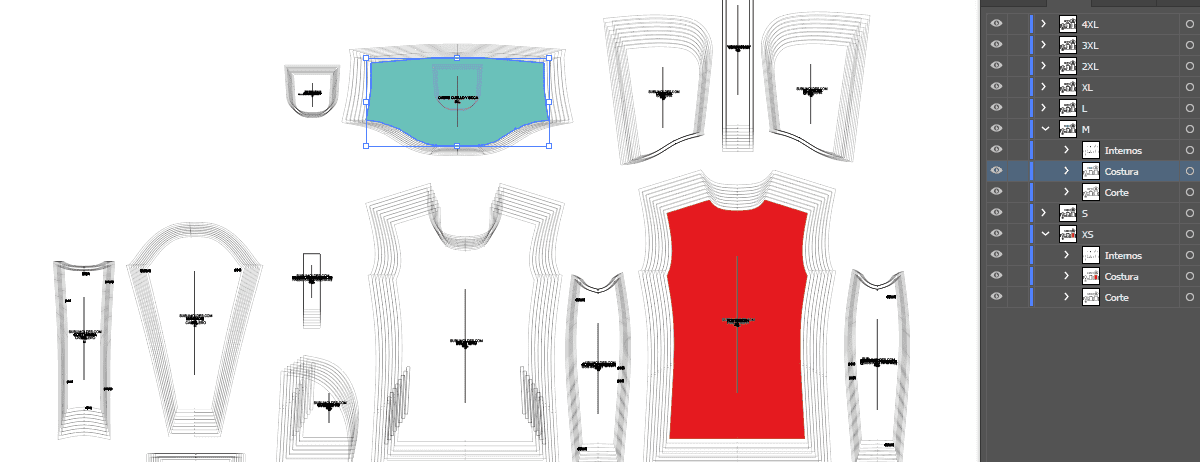
What are Digital Sewing Patterns for Illustrator AI / DXF vectorized applied to the textile area?
The Digital Sewing Patterns for Illustrator DXF-AI are files containing the basic design of a garment or pattern (T-shirts, dresses, pants, etc.) created with vector graphics. This type of file is ideal for working on Adobe Illustrator, where you can customize colors, textures, patterns and more, before preparing it for printing or making.
Advantages of use Digital Sewing Patterns for illustrator AI / DXF
Precise and detailed edition:
- Illustrator allows to modify each line, curve, and design point with great precision. This is useful to adjust details in Sewing Patterns textiles such as seams, tweezers or seam margins.
Compatibility with advanced patterns:
- Illustrator has specific tools to create and apply repetitive patterns. You can design custom prints (floral, geometric, abstract) and apply them directly to the Sewing Pattern.
Perfect scalability:
- By being vector, the file can be expanded or reduced without losing quality, which allows you to adjust Sewing Patterns different Sizes or sizes easily.
Organized capes:
- The files in Illustrator can work with layers, which makes it easier to separate elements from the design (e.g. front, back, sleeves) and keep the project organized.
Precise colours for textile printing:
- Illustrator allows to work with color systems like CMYK or Pantoneessential to ensure that the colors are correctly printed in fabric.
Optimized export:
- You can export the final design in formats compatible with different textile printing techniques, such as sublimation, screen printing, or textile vinyl.
Integration with other programmes:
- Illustrator easily integrates with other Adobe programs, such as Photoshopto add rasterized effects; or InDesignIf you need to create catalogues of your designs.
How to use Digital Sewing Patterns for illustrator AI / DXF?
Open the file:
- Open the PDF file in Illustrator. Make sure you select the option to keep the layers and the editable elements.
Customize the Sewing Pattern:
- Change colors: Use the selection tool to apply solid or degraded colors to different parts of the Sewing Pattern.
- Add patterns: Create or apply patterns from the Illustrator library (Window > Sample Libraries > Patterns).
- Modify forms: Adjust lines, curves or anchorage points to customize the design.
Display the design:
- Use the preview tool (Ctrl + Y or Cmd + Y) to see only the design lines and make sure that everything is correctly aligned.
Prepare for printing:
- Adjust the colors to CMYK or Pantone mode according to the type of textile printing you will use.
- Add cutting lines or registration marks if necessary for making.
Export File:
- Save the design in formats compatible with the printer or textile workshop, such as PDF, AI, or EPS.
Practical example:
Suppose you have a Sewing Pattern from a PDF dress:
- You open the file in Illustrator.
- You select the front of the dress and apply a floral pattern from the pattern library.
- You change the color of the sleeves to a degrade of pastel tones.
- Adjust seams with the direct selection tool to round the curves.
- You export the final PDF design for sublimation printing.
Specific benefits of Illustrator compared to other programs:
- Precision: Illustrator is ideal for working with complex vectors and technical details in Sewing Patterns textiles.
- Advanced tools: Functions such as degrade mesh or wrapping effects They allow you to create unique designs.
- Universal compatibility: The AI and PDF files exported from Illustrator are widely accepted in the textile industry.
Free download Digital Sewing Patterns For Illustrator AI / DXF
Download a Digital Sewing Pattern Free in Illustrator-by-layer format from our website to get to know this wonderful option at the best price

